Photo Booth App vs Photo Booth Rental: Which Is Right for Your Event?
Introduction
Every event planner faces the same question: should I rent a physical photo booth or use a photo booth app? Traditional rentals have been the default for years, but mobile photo booth solutions have closed the gap and then some. Today's event photo booth apps offer features that rentals simply cannot match, often at a fraction of the cost.
This guide breaks down the real differences between photo booth apps and photo booth rentals so you can make the right choice for your event, your guests, and your budget.
Photo Booth Rental: The Traditional Approach
Physical photo booth rentals remain a familiar option. Here's what they typically include:
What You Get
- A self-contained booth with camera, lighting, and backdrop
- An on-site operator to manage setup and troubleshoot
- Physical props (hats, glasses, signs)
- Instant print strips for guests
- A USB drive or online gallery delivered days after the event
The Costs
Traditional photo booth rental prices vary by region, but expect to pay between €500 and €1,500 for a standard 3-4 hour booking. That baseline often excludes extras:
- Travel fees: €50-€150 for venues outside the operator's area
- Setup and teardown time: Typically 1-2 hours, sometimes charged extra
- Overtime: €100-€200 per additional hour
- Print supplies: Included in most packages, but reprints cost extra
- Custom backdrops: €50-€200 for branded or themed options
The Limitations
Beyond cost, rentals come with practical constraints:
- Guest queues: Only one group at a time, leading to 5-10 minute waits during peak moments
- Floor space: Booths require 2-3 square meters of dedicated venue space
- Limited captures: Typically 2-4 shots per session, with guests visiting once or twice
- Logistics: Booking weeks in advance, coordinating venue access for setup, ensuring power supply
- Indoor only: Most rental booths aren't designed for outdoor or multi-area events
Photo Booth App: The Modern Alternative
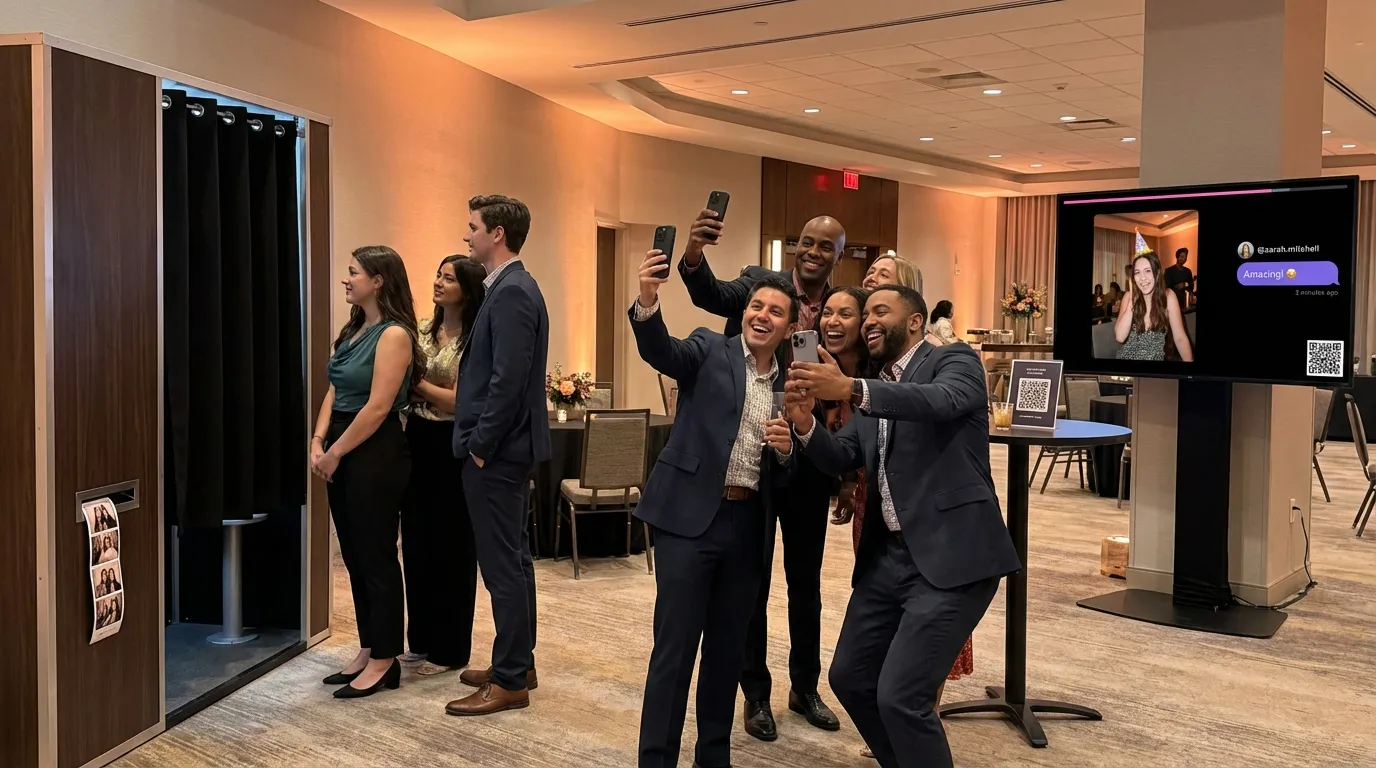
A photo booth app turns every guest's smartphone into a capture station. No equipment to rent, no operator to hire, no queue to join.
What You Get
- Unlimited simultaneous capture from every guest's device
- Real-time photo wall streaming to venue displays
- Cloud-based album with all photos and videos collected automatically
- Custom branding with your event colors and logo
- Instant access via QR code, no app download required
The Costs
App-based solutions use per-guest pricing instead of flat rental fees. With Pinapose:
- 1-5 guests: Free, no payment required
- 6+ guests: €0.30 per guest after the first five
That's it. No setup fees, no travel charges, no overtime costs, no hidden extras.
The Advantages
- Zero queues: Every guest captures simultaneously from their own device
- No floor space needed: Guests photograph from wherever the action is
- Unlimited captures: Each guest can take up to 30 photos and videos throughout the event
- Instant sharing: Photos sync to the cloud the moment they're captured
- Works everywhere: Indoors, outdoors, across multiple rooms or venues
Cost Comparison: Real Numbers
Let's compare actual costs across three common event sizes:
Small Wedding (50 Guests)
| Photo Booth Rental | Pinapose | |
|---|---|---|
| Base cost | €700 (4 hours) | €13.50 (50 guests, first 5 free) |
| Setup/Travel | €100 | €0 |
| Extra prints | €50 | N/A (digital) |
| Total | €850 | €13.50 |
Corporate Event (200 Guests)
| Photo Booth Rental | Pinapose | |
|---|---|---|
| Base cost | €1,200 (6 hours) | €58.50 (200 guests, first 5 free) |
| Overtime | €200 | €0 |
| Branded backdrop | €150 | €0 (built-in branding) |
| Total | €1,550 | €58.50 |
Large Celebration (500 Guests)
| Photo Booth Rental | Pinapose | |
|---|---|---|
| Base cost | €1,500 (6 hours) | €148.50 (500 guests, first 5 free) |
| Multiple booths (to reduce queues) | €1,000 | €0 |
| Travel/Setup | €200 | €0 |
| Total | €2,700 | €148.50 |
The savings scale dramatically with event size because app-based pricing grows linearly while rental costs multiply when you need additional booths to serve more guests.
Feature-by-Feature Comparison
Guest Experience
Rental: Guests wait in line, enter the booth, pose for 2-4 shots, collect a print strip, and leave. Fun but brief.
App: Guests scan a QR code, open the booth instantly in their browser, and capture photos and videos throughout the entire event. No download, no account creation, no waiting. Events can even enable anonymous access so guests enter with just a nickname.
Real-Time Display
Rental: Some premium rentals offer a slideshow screen. Most don't.
App: Pinapose streams captures to any connected display in real-time. Choose from three broadcast styles: elegant for professional transitions, dynamic for energetic celebrations, or cinematic for documentary-style Ken Burns effects. Connect a TV, projector, or video wall and your live carousel becomes the centerpiece of your venue.
Customization
Rental: Custom backdrops and props at additional cost. Limited to physical elements.
App: Full digital branding through the booth editor. Upload your logo, choose a color theme that matches your event, or fine-tune individual colors. Every guest sees your branding the moment they access the booth. No printing costs, no setup time.
Content Moderation
Rental: The operator reviews photos in real-time. Practical for small events, impossible to scale.
App: Toggle moderation when creating your event. Designated moderators review captures through a dedicated queue before they appear on the live display. Approve, reject, or queue content in real-time, with full stats on processed items. Essential for corporate events and public gatherings.
Guest Messages
Rental: Some booths offer a guestbook station. Most captures have no context.
App: Every photo and video can include a personal message from the guest. These dedications appear alongside captures in your album and on the live display. Choose between free-text messages, a predefined message for all captures, or disable comments entirely through your event settings.
Album and Downloads
Rental: Receive a USB drive or online gallery link days after the event. Individual prints at the event.
App: Every capture automatically organizes into your event album. Browse, search, and filter from your dashboard. After the event, download the complete collection as ZIP files in full resolution, ready to print or share.
When to Choose a Rental
Photo booth rentals still make sense in specific scenarios:
- Physical props matter: If costume accessories and themed backdrops are central to your event concept, a physical booth delivers that hands-on experience
- Print-first events: When guests must walk away with a physical print strip (though you can pair a photo printer with any app solution)
- Fully managed service: If you want someone else to handle everything on event day, an operator removes all responsibility from your team
- Very small intimate gatherings: For events under 10 guests where the booth itself is a dedicated activity station, not just a capture tool
When to Choose an App
A photo booth app is the better choice when:
- Budget matters: You want photo booth features without the €500+ rental price tag
- Large guest counts: Events with 50, 200, or 500+ guests where a single booth creates bottlenecks
- Outdoor or multi-area venues: Gardens, festivals, or events spanning multiple rooms where equipment logistics become complicated
- Real-time engagement: You want a live photo wall that keeps energy high throughout the event
- Lasting digital memories: You want a complete album, not just a few print strips
- Simple setup: You'd rather spend 5 minutes creating an event online than coordinating delivery schedules, power outlets, and floor plans
How Pinapose Combines Both Worlds
Pinapose was built to deliver professional photo booth features through the simplicity of a web app:
- No app download: Guests scan a QR code and start capturing instantly. The booth runs as a progressive web app in any mobile browser, with no app store visit required.
- Photo and video: Capture photos, record videos, or upload from the device library. Each guest gets up to 30 captures to use throughout the event.
- Live streaming: Connect any screen to your event carousel and broadcast guest captures in real-time with professional transition effects.
- Full branding: Customize colors, upload your logo, and style the entire booth experience to match your event theme.
- Content control: Enable moderation for corporate or public events. Every capture goes through an approval queue before appearing on the display.
- Scalable pricing: Start free with up to 5 guests. Scale to 500 guests at €0.30 each. Professional event teams can host events with up to 5,000 guests at partner rates.
- Five languages: The booth interface supports English, Greek, French, German, and Italian, adapting to each guest's language preference.
Making Your Decision
Use this framework to choose:
| Factor | Choose Rental | Choose App |
|---|---|---|
| Guest count | Under 20 | 20+ |
| Budget | €500+ available for photo entertainment | Any budget |
| Venue type | Single indoor room with power | Any location with internet |
| Duration | 3-4 hours | Any duration (up to 48 hours, or 7 days for partners) |
| Priority | Physical prints and props | Digital album and live display |
| Setup time | 1-2 hours (handled by operator) | 5 minutes (self-service) |
For most events in 2026, the math favors a photo booth app. You get more features, more guest participation, and more memories, at a lower cost and with simpler logistics. The rental model works for specific use cases, but the gap between app capabilities and rental offerings continues to narrow every year.
Built for Professionals
If you're an event planner, DJ, or venue operator managing multiple events, Pinapose's Partner Programme offers volume discounts, event delegation, custom branding, and up to 5,000 guests per event.
Get Started in Minutes
Ready to see what a modern event photo booth looks like? Create your free event with Pinapose. Set up your booth, customize the branding, and share the QR code with your guests. Your first event with up to 5 guests is completely free, no credit card required.